Trigger on the email row, not the mailbox
Round 1 was about what Dynamics 365 does with an email before you build anything. This round is the first thing I built: the trigger, and the two checks that run before the flow spends a single AI credit. It’s the least glamorous part of the whole pipeline. It’s also the part that decided whether a customer’s reply became a second case.
Same setup as before: fictional company (Fabrikam Payments), one sandbox, a shared mailbox called Merchant Support, and a flow named S2-CaseScout-EmailIntake. Every number below was measured on 30 September and 1 October 2026, except one I computed on 26 October from the run history, and I say which.
Why: the mailbox is the wrong place to listen
The obvious trigger for “an email arrives” is the Outlook one. I had it in the plan as the fallback, in case the queue mailbox never got approved. I’m glad I didn’t need it, and here’s the reason in one sentence: by the time a Dataverse email row exists, server-side synchronization has already done half the work. Server-side sync is the service that copies mail between Exchange and Dynamics 365. For a queue mailbox it creates the email activity, resolves the sender and the recipients against your contacts, accounts and queues, puts a queue item in the queue, and, when the email is a reply to something you sent from Dynamics, links it to the same record as the original. That last one matters most. A reply in a thread arrives with its Regarding field already set to the case. A flow on the inbox sees a message; a flow on the row sees a message that already knows what it belongs to.
The second idea is cheaper and I’d argue for it in any flow that calls a model: decide whether the run should exist before you do anything that costs money. The trigger fires on every incoming email row. That includes the customer’s “thanks, that answers it”, the out-of-office from a merchant on holiday, the bounce from a dead address, and, as I found out, the platform’s own welcome message. On the known-sender path a run costs 3 AI Builder credits; on the unknown-sender path, 7 (round 3 has the breakdown). Two conditions at the top of the flow take 0.4 seconds and cost nothing. Everything after them assumes the email is real, new and ours.
How: the trigger and the two guards
1 · A queue with a mailbox that server-side sync has tested
Microsoft’s docs: Create and manage basic queues (the Incoming Email field creates the mailbox record for you) and Set up server-side synchronization.
- Copilot Service admin center → Customer support → Queues → Basic queues → New. Name it (ours: Merchant Support), type Public, and put the shared mailbox address in Incoming Email. Saving creates the mailbox record.
- Open the mailbox record. Server profile: Microsoft Exchange Online. Incoming email: server-side synchronization. Then Approve Email and Test & Enable Mailbox. In our tenant both needed the admin who owns Exchange, which meant a hand-off and half a day’s wait. The gate is Incoming Email Status = Success. Until you see it, nothing you build downstream can be tested for real.
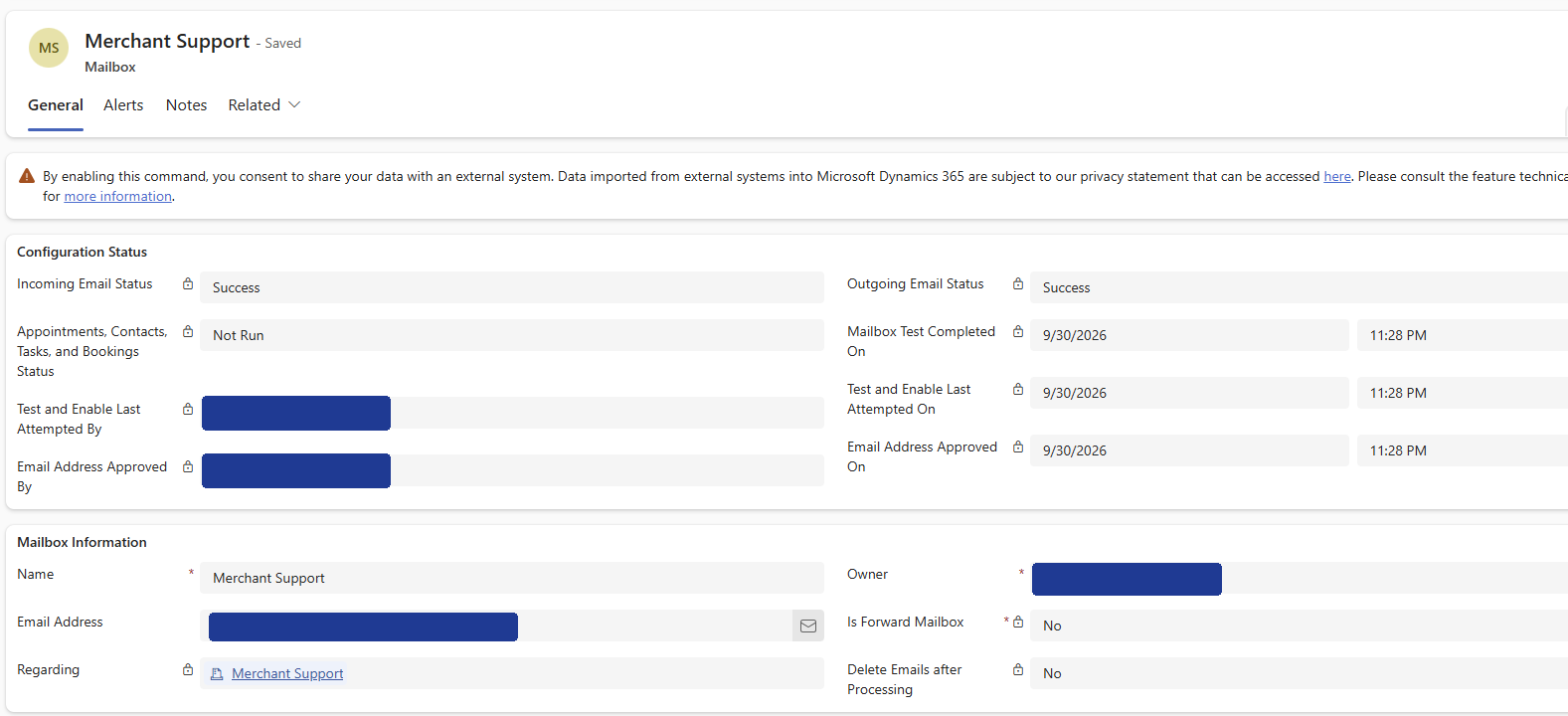
Already, without a flow, every message that reaches the shared mailbox becomes an email row in Dataverse, with the sender and the recipients matched to your contacts and queues, plus a queue item waiting in Merchant Support. The docs describe the queue-item part under Create queue items from synchronized email messages.
2 · The trigger: one table, one change type, one filter
Microsoft’s docs: Trigger flows when a row is added, modified, or deleted.
- In a solution, new automated cloud flow, trigger When a row is added, modified or deleted (Microsoft Dataverse). Change type: Added. Table name: Email Messages. Scope: Organization.
- Filter rows:
directioncode eq false. That’s the whole filter: incoming email only. directioncode is the column that says whether the email is outgoing (true) or incoming (false). The filter is an OData expression, which is the query language the Dataverse Web API speaks, and it’s evaluated after the row is saved. - Run as: I left it on the flow owner. It only changes anything for steps that borrow the connection of whoever caused the trigger, and none of ours do. Every step uses the flow’s own connections, so it’s my Dataverse connection doing the work either way.
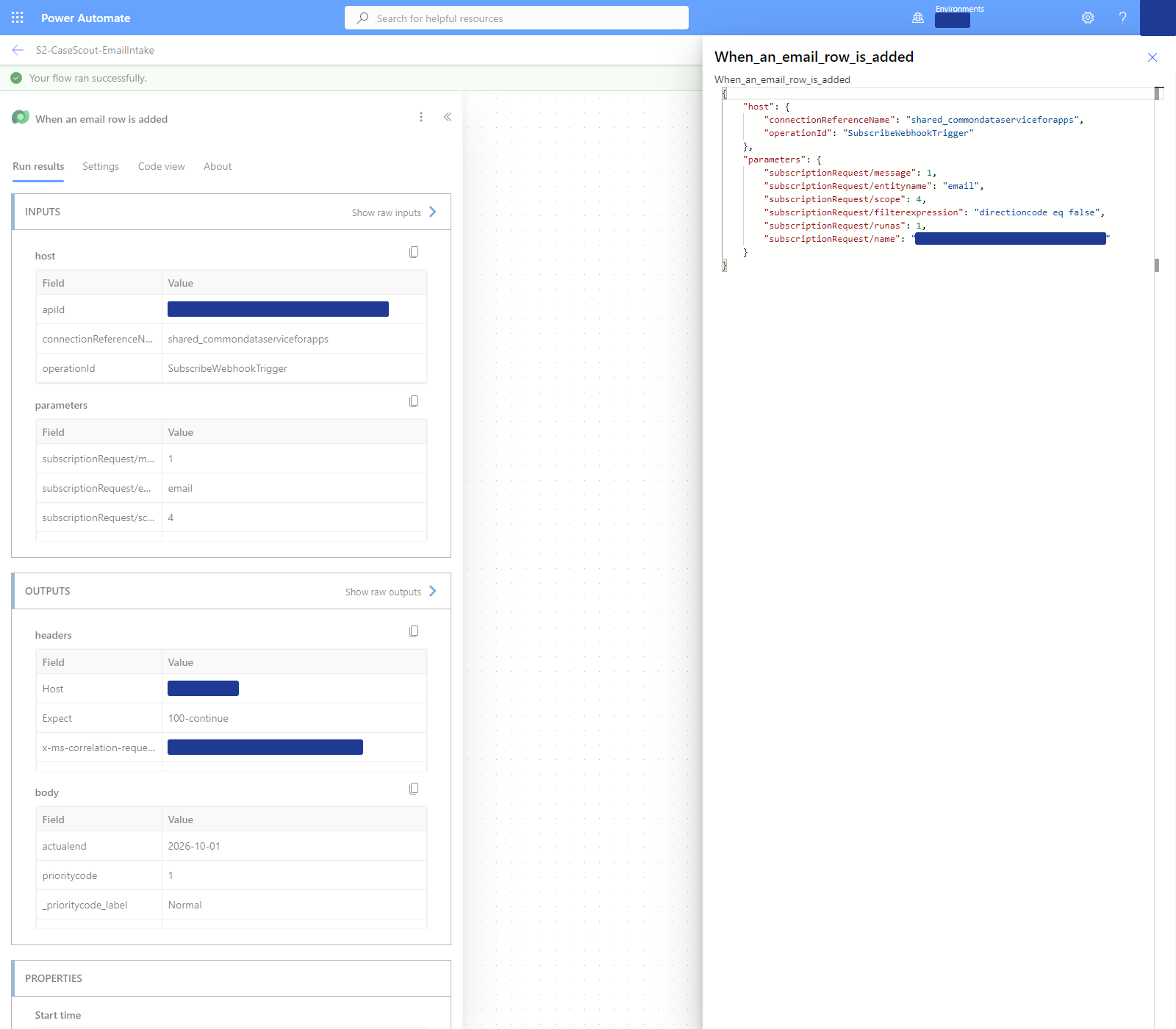
You’ll notice the mailbox address isn’t in the filter. I had planned it there (contains(torecipients, '…')) and moved it into the flow on purpose. Two reasons. The address lives in an environment variable, so it can change per environment without touching the definition (Use environment variables in solutions). And a trigger that doesn’t fire leaves no trace, while a run that stops itself can write down why. When something doesn’t work at two in the morning, the second one is the flow you want to be debugging. The “where it bit us” section has the night I learned that.
3 · Concurrency: on, and small
Microsoft’s docs: the Concurrent runs row in Limits of automated, scheduled, and instant flows.
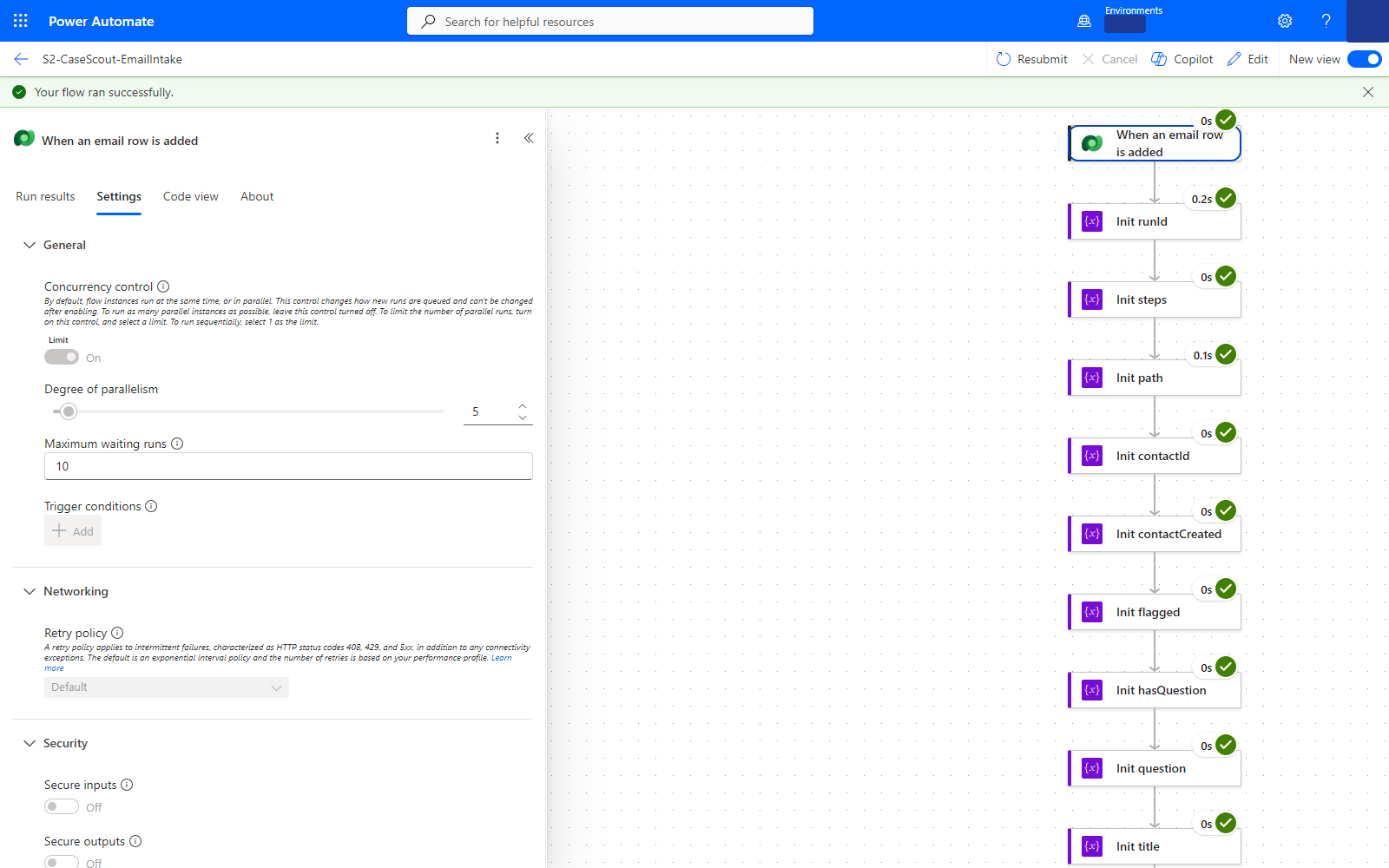
- Trigger card → Settings → Concurrency control: On → Degree of parallelism: 5. The docs give the default as 25 once the control is on and unlimited while it’s off. I chose 5 so that a burst of test emails couldn’t stampede the prompt actions. I did not load-test it; the latency numbers below are sequential runs. One line from that docs page is worth reading twice: turning concurrency control on can’t be undone without deleting and re-adding the trigger. Decide before you build the rest of the flow on top of it.
4 · Guard one: is it ours, and is it new?
- A Condition named Guard mailbox and regarding, with two rows joined by And:
toLower(triggerOutputs()?['body/torecipients'])containstoLower(<the mailbox environment variable>). The To line of the email, lower-cased, must contain our queue’s address.triggerOutputs()?['body/_regardingobjectid_value']is equal tonull. The email must not already be regarding anything.
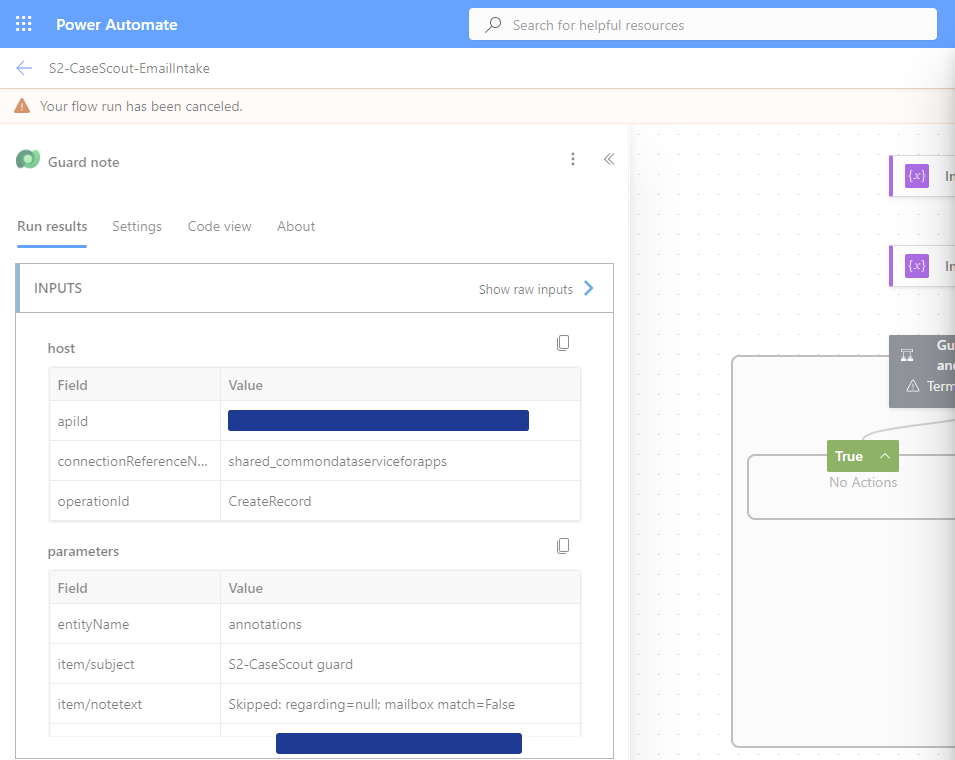
- If yes: nothing. The flow continues. If no: two actions. Add a new row on Notes, attached to the email, with the subject “S2-CaseScout guard” and the text
Skipped: regarding=<id or null>; mailbox match=<true or false>. Then Terminate with the status Cancelled.
Cancelled, not Failed, on purpose. A skipped email isn’t an error. If you mark it failed, the run list turns red for the wrong reasons and the day you add a failed-run alert, it fires on every thread reply.
5 · Guard two: is it a machine talking?
- A second Condition, Guard noise, five rows joined by Or: the subject starts with “automatic reply”; the subject starts with “out of office”; the subject contains “undeliverable”; the sender starts with “mailer-daemon”; the sender starts with “postmaster”. All lower-cased first.
- If yes: a note on the email (“Skipped: auto-reply or delivery notification (loop guard); no case, no credits”) and Terminate, Cancelled. If no: continue.
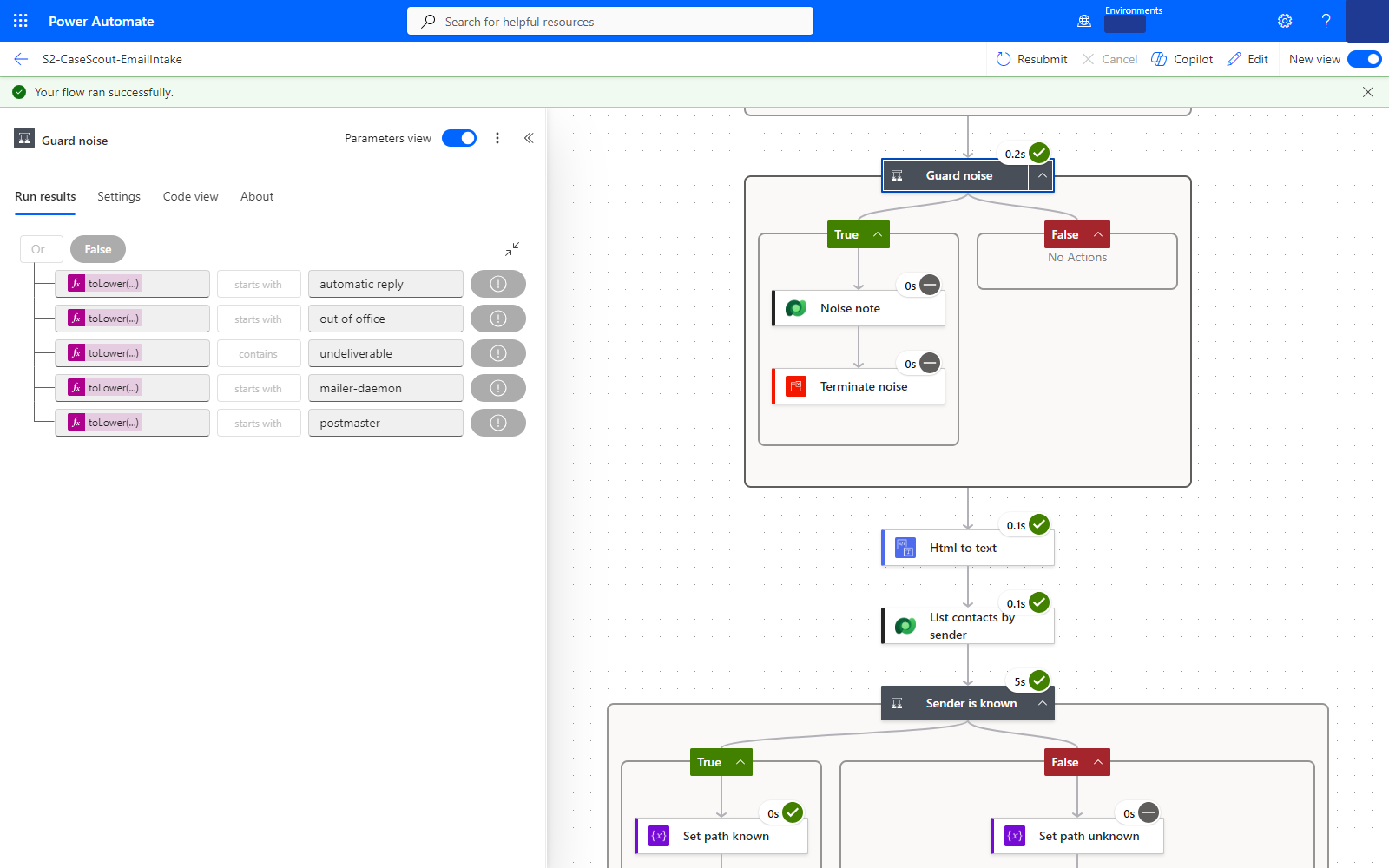
Here is the honest part. Microsoft’s page on email filtering and correlation says plainly that server-side sync doesn’t check whether an incoming email is an automatic reply, and then tells you where to look: the InternetMessageHeaders column on the email, which holds the Auto-Submitted header when there is one. I read that page after the session. My guard matches words in the subject. Words in a subject are what a person wrote or what their mail client wrote in their language; a header is what the sending system declared. If I built it again I’d test the header first and keep the subject words as the second net. I’d also like to tell you how many out-of-office replies the guard caught. It caught none, because none arrived during the two weeks of testing. The guard is designed and deployed, and not yet exercised by a real one. I’ll report it when it happens.
6 · What comes after the guards
- Convert the body from HTML to text (the Content Conversion connector), look up the sender among the contacts (round 4), run one of the prompts (round 3), create the case, and set the email’s Regarding to that case. That last update is the other half of guard one: it’s what makes the email “not new” for any later run, including the rule from round 1 if you left it on.
What we measured
| What | Result | How many, when |
|---|---|---|
| Email row created → flow run started (the trigger’s own delay) | median 2.3 s, p90 10.7 s, max 13.4 s | 24 runs on 30 Sep; computed on 26 Oct from the run-start times in run history against the harness log |
| Email row created → case created | median 15 s, p90 18 s on the 11 scripted test emails; median 9 s across all 24 runs | 30 Sep |
| Same, live, through server-side sync | 12 s and 15 s | 2 runs, 30 Sep and 1 Oct |
| Mailbox → email row (server-side sync’s own leg) | not measured | the first live email after the mailbox had sat idle took minutes to appear as a row; I didn’t timestamp the send, so I can’t give you a number |
| Guard one on a reply in the thread | run stopped at the condition after 0.4 s, note written in 0.3 s, no second case, no credits | 1 Oct, live |
| Guard one on the platform’s own welcome email | skipped: mailbox match = false | 30 Sep, the first row server-side sync ever delivered to the flow |
| Guard two on a real auto-reply | not exercised | — |
The first row is new. In the session I quoted “15 seconds to a case” and said the trigger delay wasn’t separately measured. It is now: Power Automate keeps the start time of every run, and the harness kept the time each email row was created, so 24 pairs were sitting there waiting to be subtracted. Median two seconds, with a tail at ten to thirteen. The rest of the 15 seconds is the flow itself, mostly the prompt.
The row that matters most is the reply in the thread. Microsoft’s correlation page lists the order server-side sync uses to link a reply to what you sent: the InReplyTo header first (the mail standard’s way of saying “this answers that message”), then tracking tokens, then conversation index, then smart matching. On 1 October I replied, as the customer, to the answer the flow had sent from the queue mailbox. Server-side sync delivered the reply already regarding the case, with InReplyTo present. The trigger fired, because a new incoming email row is a new incoming email row. The guard saw a non-null Regarding, wrote its note and cancelled the run. One case, one thread.
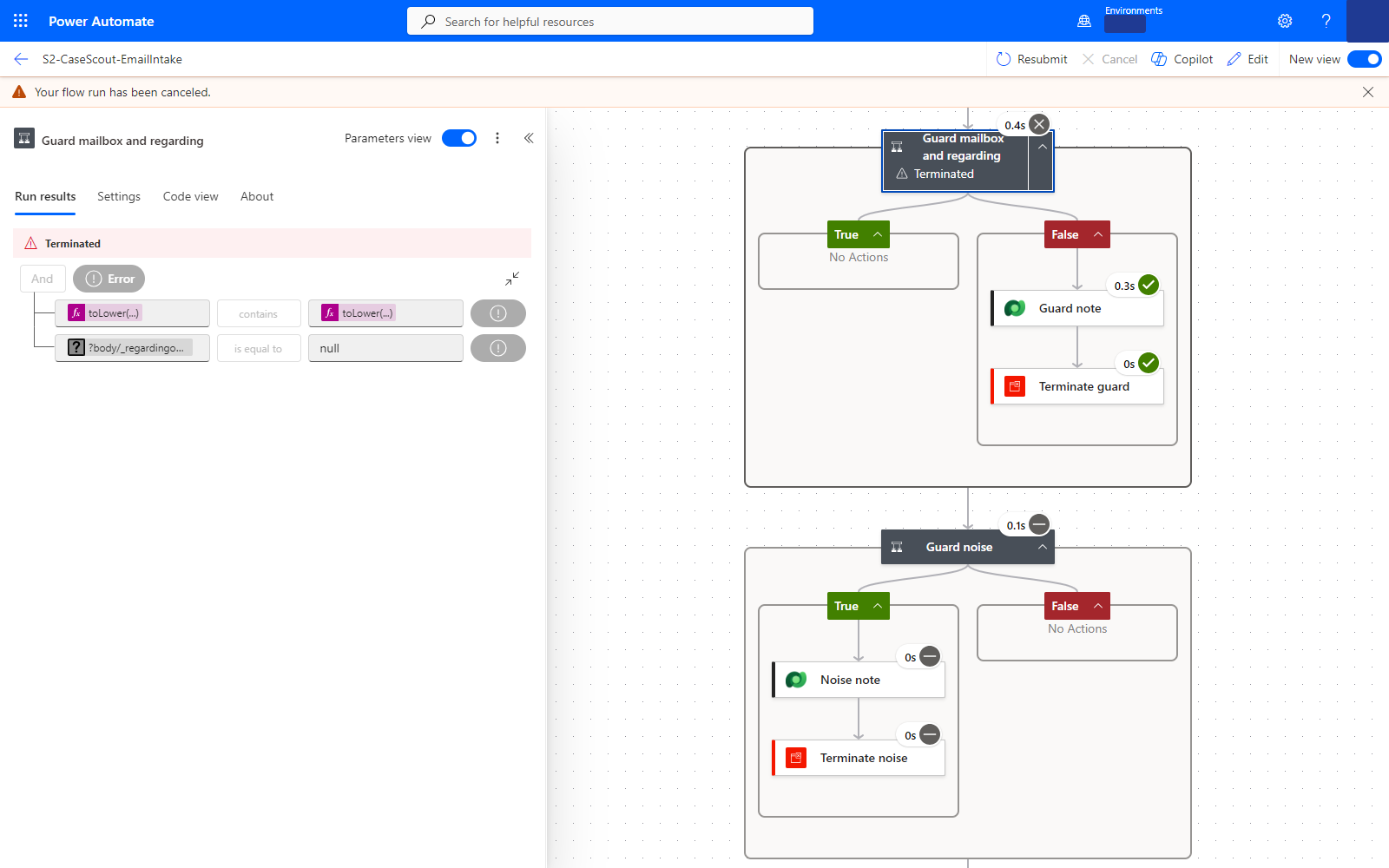
And the welcome email, which I’d forgotten until I went looking for guard notes this week. Seventeen minutes before the first real test email, the first row server-side sync ever handed the flow was “Your mailbox is now connected to Dynamics 365”, the message the platform sends to a mailbox once it’s enabled. Guard one skipped it: mailbox match = false. Here’s what I think happened, and I’m not certain. That message goes to the queue mailbox itself, so the To line should have matched. But my log records the real address going into the environment variable twelve minutes after that run; until then it held a placeholder. So the guard most likely stopped the run because the flow didn’t yet know its own mailbox. Which is the right outcome, and a check I now run before the first email: is the variable set, and is it the queue’s address?
Where it bit us
The reply that could never have been correlated. The first approved reply left through the Office 365 Outlook connector, from my own mailbox, because the queue mailbox wasn’t live yet. It arrived at the customer, fine. But a reply to that email would have come back to my inbox, not the queue, and server-side sync would have had nothing to correlate it with. Guard one would have seen a null Regarding and created a second case for the same conversation. The fix, the same evening: the reply is created as a Dataverse email activity from the queue mailbox and sent with the SendEmail action, so the thread is Dynamics’ thread end to end. Round 6 shows the send step. The lesson sits here, though: the guard only works if the outbound side is tracked too.
The trigger that never fired. For the second flow (round 7’s “pattern B”, where the native rule creates the case and the flow extends it) I wrote the filter caseorigincode eq 2 and fpd_path eq null. The subscription registered. The rule created its case. Nothing ran, and there was nothing to look at: no run, no note, no error. I took the null test out of the filter and put it inside the flow as a condition, and it ran on the next case. I can’t tell you whether eq null is unsupported in the trigger filter or whether the column wasn’t on the row at the moment of evaluation; I can tell you it was silent either way. Keep the filter to columns you know are set when the row is created, and test for “empty” inside the flow where a failed test leaves a trace.
Five seconds too early. After turning the flow on, I sent the test email five seconds later. It never triggered. The next one did. The callback registration isn’t instant; give a freshly activated flow a moment before you test it, and if the first run is missing, resend before you debug.
The test that only half-counted. My first thread-reply test, on the afternoon of 30 September, was simulated: no mailbox existed yet, so the harness created the reply row already regarding the case. That proved the guard. It did not prove that server-side sync would correlate a real reply, which is the part you actually care about. The live test that night proved both. If you’re reporting a guard like this, say which of the two you tested.
What to download
The trigger and the two guards, as JSON lifted from the flow definition: trigger-and-guards.json. Inside: the trigger exactly as configured (table, change type, scope, filter, concurrency), both guards with their expressions, and the mailbox parameter with no address in it, so you type your own. Fictional data, sandbox only. The full pack, with the whole flow, is on the downloads page.
Try it this week
Open any flow you have that listens to a mailbox or an email table, go to its run history, and filter by Cancelled. If the list is empty and the flow has been running for more than a week, ask yourself where the out-of-office replies went. Then open one successful run and look at the time between the row’s creation and the run’s start; it’s two numbers on the screen, and nobody I’ve asked had ever subtracted them. Tell me what you got, I’ll add it to the table.
Next round: five prompts, one job each. Why the Summary prompt cost 3 credits on one model and 43 on another, and how to read the price from the action’s output.

Lorenc Koka, MD · Senior Delivery Director - Solutions Architecture, D365 CE · Argano
I build governed AI and automation on Dynamics 365 and the Power Platform for enterprise clients, and write down what I learn doing it.
 5× FastTrack Recognized Solution Architect Dynamics 365 Customer Engagement · 2022 – 2026